Eleições 2010: veja como fica composição do Senado a partir de 2011
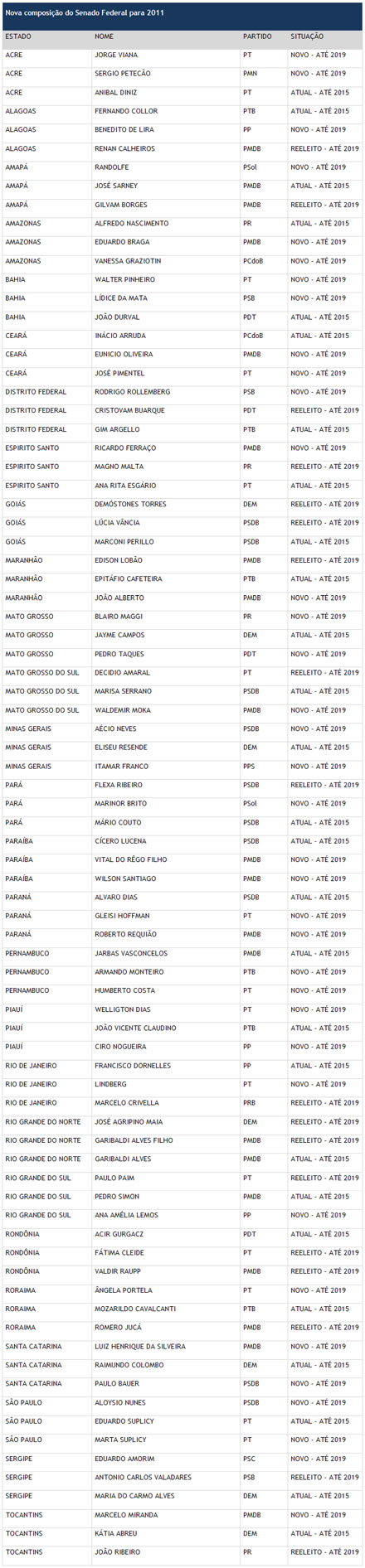
Neste domingo, 2/3 das vagas do Senado foram definidas pelas urnas. Foram eleitos 35 novos senadores (64,81%) e 19 foram reeleitos. Os partidos que elegeram o maior número de senadores em 2010 foram PMDB (16) e PT (11). Esses números garantem uma recomposição política do Senado e, caso Dilma seja eleita no 2º turno, poderá contar com uma base de sustentação política mais favorável no Senado. Nas eleições de 2015, 27 vagas ao Senado estarão em disputa.
Dos senadores que faziam oposição ostensiva ao presidente Lula Inácio Lula da Silva e que tentarem a reeleição, apenas os senadores José Agripino (DEM-RN) e Demóstenes Torres (DEM-GO) foram reeleitos; e mesmo assim porque fizeram uma campanha sem agressões a Lula.
Nomes de peso foram derrotados para eleição do Senado. Em Pernambuco, o veterano Marco Maciel (DEM) ficou de fora. No Amazonas, o tucano Artur Virgílio perdeu a vaga para Vanessa Grazziotin (PCdoB). No Ceará, Tasso Jereissati (PSDB) ficou em terceiro.
No Piauí, Mão Santa (PSC) obteve apenas 14,16% dos votos, ficando em terceiro lugar. Heráclito Fortes (DEM) ficou em quarto lugar, com 13,84%. Na Paraíba, Efraim Morais (DEM) ficou em terceiro lugar, com 28,17% dos votos válidos.
Foram eleitos 35 novos senadores (64,81%); 19 foram reeleitos. 27 têm mandato até 2015.
Veja abaixo a tabela por estado, com os nomes dos novos e reeleitos, e ainda uma por partido: nova composição do Senado Federal para 2011
Da redação com informações do Diap
ENVIE A MATÉRIA:
<%
Dim objCDONTS ' Email object
Dim strFromName ' From persons' real name
Dim strFromEmail, strToEmail ' Email addresses
Dim strSubject, strBody ' Message
Dim strThisPage ' This page's URL
Dim strReferringPage ' The referring page's URL
Dim bValidInput ' A boolean indicating valid parameters
' Retrieve this page name and referring page name
strThisPage = Request.ServerVariables("SCRIPT_NAME")
strReferringPage = Request.ServerVariables("HTTP_REFERER")
' Debugging lines:
'Response.Write strThisPage & "
" & vbCrLf
'Response.Write strReferringPage & "
" & vbCrLf
' Read in and set the initial values of our message parameters
strFromName = Trim(Request.Form("txtFromName"))
strFromEmail = Trim(Request.Form("txtFromEmail"))
strToEmail = Trim(Request.Form("txtToEmail"))
strSubject = "www.contee.org.br"
strBody = Trim(Request.Form("txtMessage"))
' I set the body message to a message that referenced the page the
' user arrived from. This makes it great if you place a link to it
' from your different articles, but can be weird if people link in
' from other web sites.
If strBody = "" Then
If strReferringPage = "" Or InStr(1, strReferringPage, "www.contee.org.br", 1) = 0 Then
strBody = ""
strBody = strBody & "O link abaixo é uma sugestão de leitura: Eleições 2010: veja como fica composição do Senado a partir de 2011" & vbCrLf
strBody = strBody & vbCrLf
strBody = strBody & "http://www.contee.org.br/noticias/msoc/nmsoc1432.asp" & vbCrLf
Else
strBody = "O link abaixo é uma sugestão de leitura: Eleições 2010: veja como fica composição do Senado a partir de 2011"
sstrBody = strBody & "O link abaixo é uma sugestão de leitura: Eleições 2010: veja como fica composição do Senado a partir de 2011" & vbCrLf
strBody = strBody & vbCrLf
strBody = strBody & "http://www.contee.org.br/noticias/msoc/nmsoc1432.asp" & vbCrLf
End If
End If
' Quick validation just to make sure our parameters are somewhat valid
bValidInput = True
bValidInput = bValidInput And strFromName <> ""
bValidInput = bValidInput And IsValidEmail(strFromEmail)
bValidInput = bValidInput And IsValidEmail(strToEmail)
' If valid send email and show thanks, o/w show form
If bValidInput Then
' Set up our email object and send the message
Set objCDONTS = Server.CreateObject("CDONTS.NewMail")
objCDONTS.From = strFromName & " <" & strFromEmail & ">"
objCDONTS.To = strToEmail
objCDONTS.Subject = strSubject
objCDONTS.Body = strBody
objCDONTS.Send
Set objCDONTS = Nothing
' Show our thank you message
ShowThanksMsg
Else
If "http://" & Request.ServerVariables("HTTP_HOST") & strThisPage = strReferringPage Then
Response.Write "Foi encontrado erro no preenchimento. Por favor confira os dados:" & "
" & vbCrLf
End If
' Show our information retrieval form
ShowReferralForm strThisPage, strFromName, strFromEmail, strToEmail, strBody
End If
' End of page logic... subs and functions follow!
%>
The Message to be sent:
'Subject: < %= strSubject % >
'Body: < %= strBody % >
End Sub ' This just shows our thank you message... probably didn't need to ' be a function, but since I made the form one I figured I'd do this ' for consistency. Sub ShowThanksMsg() %>Sua mensagem foi enviada com sucesso. <% End Sub %>