Coordenadoria das Centrais Sindicais do Cone Sul visita a CTB
A direção da CTB recebeu nesta quinta-feira (10) a visita dos secretários de relações internacionais da Central de Trabalhadores da Argentina (CTA), Adolfo “Fito” Aguirre e Andrés Larisgoitia, representando a Coordenadoria das Centrais Sindicais do Cone Sul (CCSCS), como objetivo de apresentar a nova política da coordenadoria e estreitar as relações com o movimento sindical brasileiro para formar uma frente de luta em defesa dos trabalhadores.
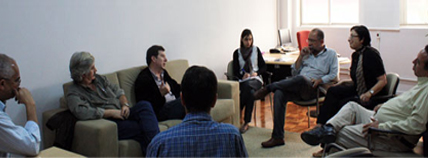
A primeira reunião da nova direção da coordenadoria será em Buenos Aires (Argentina) nos dias 29 e 30 de outubro.
Fito Aguirre explicou como estará sendo conduzida a nova gestão da CCSCS que pretende participar da “Cúpula de Montevideo”, Uruguai, prevista para ocorrer no mês de dezembro, com a expectativa de reunir mais de 4 mil trabalhadores do Cone Sul.
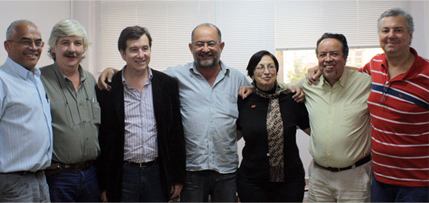
O presidente da CTB, Wagner Gomes, saudou a presença dos sindicalistas argentinos, afirmando que a unidade do movimento sindical é a principal bandeira da central, e que a nova direção da coordenadoria pode desenvolver um trabalho importante para unificar as entidades sindicais filiadas na Federação Sindical Mundial e na Federação Sindical das Américas. “Nós estamos de acordo com as propostas da nova coordenadoria, pois se conseguirmos colocar todas as centrais sindicais do Cone Sul na Cúpula de Montevideo será importante para construir a unidade do movimento sindical em na nova coordenadoria”,concluiu Wagner Gomes.
Fonte: Portal CTB
<% Dim objCDONTS ' Email object Dim strFromName ' From persons' real name Dim strFromEmail, strToEmail ' Email addresses Dim strSubject, strBody ' Message Dim strThisPage ' This page's URL Dim strReferringPage ' The referring page's URL Dim bValidInput ' A boolean indicating valid parameters ' Retrieve this page name and referring page name strThisPage = Request.ServerVariables("SCRIPT_NAME") strReferringPage = Request.ServerVariables("HTTP_REFERER") ' Debugging lines: 'Response.Write strThisPage & "
" & vbCrLf 'Response.Write strReferringPage & "
" & vbCrLf ' Read in and set the initial values of our message parameters strFromName = Trim(Request.Form("txtFromName")) strFromEmail = Trim(Request.Form("txtFromEmail")) strToEmail = Trim(Request.Form("txtToEmail")) strSubject = "www.contee.org.br" strBody = Trim(Request.Form("txtMessage")) ' I set the body message to a message that referenced the page the ' user arrived from. This makes it great if you place a link to it ' from your different articles, but can be weird if people link in ' from other web sites. If strBody = "" Then If strReferringPage = "" Or InStr(1, strReferringPage, "www.contee.org.br", 1) = 0 Then strBody = "" strBody = strBody & "O link abaixo é uma sugestão de leitura: Coordenadoria das Centrais Sindicais do Cone Sul visita a CTB" & vbCrLf strBody = strBody & vbCrLf strBody = strBody & "http://www.contee.org.br/noticias/msoc/nmsoc768.asp" & vbCrLf Else strBody = "O link abaixo é uma sugestão de leitura: Coordenadoria das Centrais Sindicais do Cone Sul visita a CTB" sstrBody = strBody & "O link abaixo é uma sugestão de leitura: Coordenadoria das Centrais Sindicais do Cone Sul visita a CTB" & vbCrLf strBody = strBody & vbCrLf strBody = strBody & "http://www.contee.org.br/noticias/msoc/nmsoc768.asp" & vbCrLf End If End If ' Quick validation just to make sure our parameters are somewhat valid bValidInput = True bValidInput = bValidInput And strFromName <> "" bValidInput = bValidInput And IsValidEmail(strFromEmail) bValidInput = bValidInput And IsValidEmail(strToEmail) ' If valid send email and show thanks, o/w show form If bValidInput Then ' Set up our email object and send the message Set objCDONTS = Server.CreateObject("CDONTS.NewMail") objCDONTS.From = strFromName & " <" & strFromEmail & ">" objCDONTS.To = strToEmail objCDONTS.Subject = strSubject objCDONTS.Body = strBody objCDONTS.Send Set objCDONTS = Nothing ' Show our thank you message ShowThanksMsg Else If "http://" & Request.ServerVariables("HTTP_HOST") & strThisPage = strReferringPage Then Response.Write "Foi encontrado erro no preenchimento. Por favor confira os dados:" & "
" & vbCrLf End If ' Show our information retrieval form ShowReferralForm strThisPage, strFromName, strFromEmail, strToEmail, strBody End If ' End of page logic... subs and functions follow! %> <% ' Subroutines and Functions that encapsulate some functionality ' and make the above code easier to write... and read. ' A quick email syntax checker. It's not perfect, ' but it's quick and easy and will catch most of ' the bad addresses than people type in. Function IsValidEmail(strEmail) Dim bIsValid bIsValid = True If Len(strEmail) < 5 Then bIsValid = False Else If Instr(1, strEmail, " ") <> 0 Then bIsValid = False Else If InStr(1, strEmail, "@", 1) < 2 Then bIsValid = False Else If InStrRev(strEmail, ".") < InStr(1, strEmail, "@", 1) + 2 Then bIsValid = False End If End If End If End If IsValidEmail = bIsValid End Function ' I made this a function just to get it out of the ' logic and make it easier to read. It just shows the ' form that asks for the input Sub ShowReferralForm(strPageName, strFromName, strFromEmail, strToEmail, strBody) ' I use script_name so users can rename this script witout having to change the code. %> <% '
The Message to be sent:
'Subject: < %= strSubject % >
'Body: < %= strBody % >
End Sub ' This just shows our thank you message... probably didn't need to ' be a function, but since I made the form one I figured I'd do this ' for consistency. Sub ShowThanksMsg() %>Sua mensagem foi enviada com sucesso. <% End Sub %>